


KAYAK: Flights, Hotels & Cars
4.838.63K Reviews
App Specs
- Version
- 262.2
- Updated On
- License
- Free
- Downloads
- 10,000,000+
- Developer
- KAYAK.com
- Categories
- Travel & Local
- Platform
- Android, iOS
Screenshots



 Analysis by AppCompare
When it comes to planning a trip, the process can often feel like a bit of a juggling act. Enter KAYAK: Flights, Hotels & Cars, the app that promises to simplify your travel booking experience. If you're like me and love the thrill of planning your next adventure, this app might just become your new best travel buddy.
What to expect when searching
I think of KAYAK as a starting point for comparing a trip, rather than a guarantee that every booking will be the cheapest or simplest one available. Its main advantage is having flight, hotel, and car searches together, so I can get an early sense of the whole journey without opening a different service for each part. That is especially useful when I’m still deciding whether a destination or set of dates makes sense.
Search speed matters most when I’m changing several details at once: shifting a departure day, checking another airport, or comparing a hotel area. Results can depend on the search and the connection, so I wouldn’t treat a momentary wait as a sign that the app is broken. My practical approach is to narrow the question first, then adjust one choice at a time. That makes comparisons easier to understand and avoids losing track of why one option looked better.
Making comparisons that hold up
A low result is only useful if it suits the actual trip. Before I decide, I check the itinerary details and the conditions attached to the option, then compare the total plan rather than focusing on a headline price. A flight that arrives at an awkward time can make a hotel night or ground transport more complicated; a rental car may not make sense if I’ll spend the whole stay in a walkable area. KAYAK helps bring the pieces into view, but the final judgement still belongs to the traveler.
For a flexible getaway, I’d use Explore to discover destinations that fit a spending limit, then run a more focused search once an idea stands out. For a fixed work trip, I’d do the reverse: start with exact dates and airports, compare flight choices, and only then look at accommodation near the place I need to be. Those two workflows use the same app differently, and the second avoids getting sidetracked by appealing fares that do not fit the schedule.
The app is free, and KAYAK.com is the developer. It is a travel and local app with an Everyone age rating; its current version is 256.1 and it requires Android 9 or later. Its average rating is 4.8 from around 411,000 ratings, with about 39,000 written reviews and over 10 million installs. Those figures suggest that it is widely used, though popularity alone cannot tell me whether a particular itinerary or booking option is right for you.
Your One-Stop Travel Shop
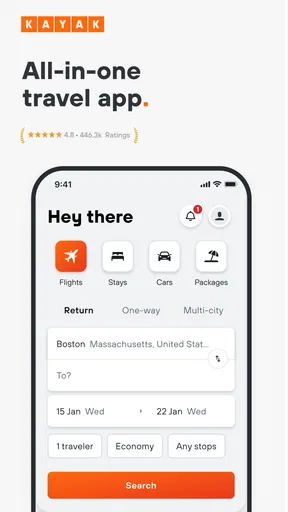
So, what's the deal with KAYAK: Flights, Hotels & Cars? It’s essentially a travel search engine that lets you compare prices for flights, hotels, and car rentals all in one place. I dove into the app to see if it lives up to the hype, and I have to say, it’s pretty impressive.
Worth Reading Before You Choose

Flipboard Shows What News Apps Must Do Beyond the Feed

Switching to Android Auto Means Rethinking Your Driving Routine

Google Calendar Makes a Crowded Week Easier to Manage

Ludo King Makes the Most of the Minutes Between Plans

Baby Panda World Brings Quick Play to Modern Phones, but Its Game Library Feels Busy

ESPN’s Live Game View Makes Following Close Games Easier
Flights: Take Off with Ease
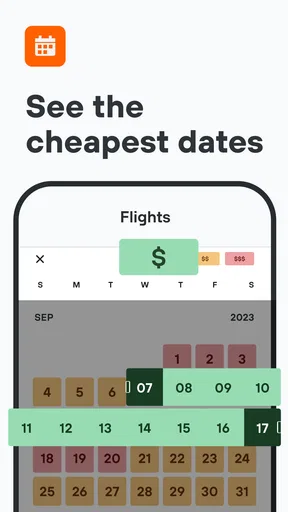
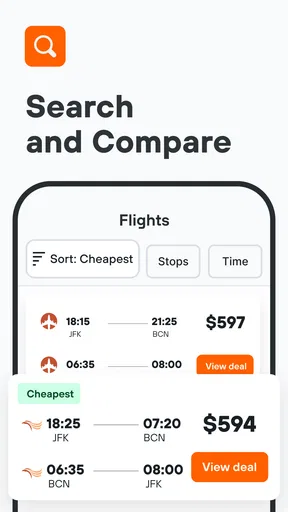
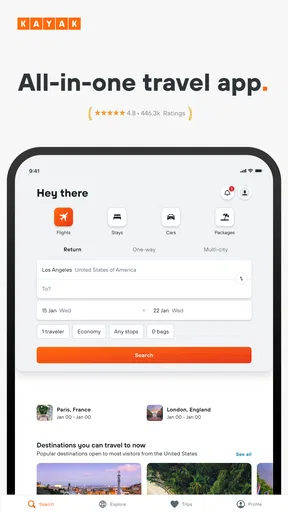
First up, let’s talk flights. The app's interface is super user-friendly. You just pop in your departure and destination cities, select your travel dates, and voila, you’re presented with a list of flight options. One of the coolest features is the "Price Forecast," which predicts whether the flight prices are likely to rise or drop. This little nugget of info can be a game-changer when you're trying to snag the best deal.
Another handy feature is the "Explore" option, which is perfect if you’re feeling adventurous. It lets you see flight prices to various destinations, based on your budget. It’s like a treasure map for spontaneous travelers!
Hotels: Sweet Dreams Are Made of This
Moving on to accommodation, the hotel search is as straightforward as the flight search. The app compiles a comprehensive list of options, from budget stays to luxury suites. You can filter results by price, star rating, amenities, and more. One thing I particularly liked is the "Hotel Deals" section, which highlights current discounts and offers. Who doesn’t love a good bargain?
The app also integrates user reviews and ratings, which I find incredibly helpful. It's always good to get a second opinion before booking a place to stay, and these reviews can provide valuable insights.
Cars: Hit the Road in Style
Need a set of wheels? The car rental feature is just as seamless. You can quickly compare rental prices from major companies and choose the best option for your trip. Whether you're looking for a compact car for a city break or an SUV for a road trip, this app has you covered.
I also found the "Price Alerts" function to be quite nifty. It keeps you in the loop about price drops, ensuring you get the best possible deal. Plus, the ability to book directly through the app saves time and hassle.
Travel Tools: More Than Just Bookings
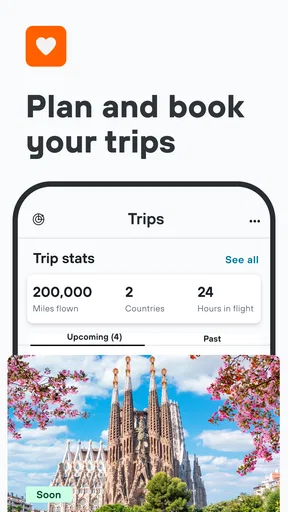
Beyond bookings, KAYAK offers some neat travel tools. The "Trips" feature allows you to organize your entire itinerary in one place. You can add flight details, hotel reservations, car rentals, and even create packing lists. It’s like having a personal travel assistant in your pocket.
Another standout feature is the "Flight Status" tracker, which provides real-time updates about flight delays and gate changes. This can be a lifesaver when you're navigating busy airports.
User Experience: Smooth Sailing
The app’s design is clean and intuitive, making it easy to navigate. Whether you're a tech novice or a seasoned pro, you’ll find it straightforward to use. Plus, the app is available on both Android and iOS, so no one’s left out.
One thing to note is that while the app itself is free, it does include ads. They’re not overly intrusive, but it’s something to keep in mind if you prefer an ad-free experience.
Using it on a busy travel day
Picture a common situation: I have a few days off, but I have not chosen where to go. I can use Explore to spot destinations within my budget, check whether a flight looks worth pursuing, and then compare places to stay. Once plans firm up, Trips gives me a place to keep the booking details together. The useful part is not just finding an attractive fare; it is being able to move from an early idea to a more organized plan without rebuilding the search from scratch.
For a day-of-travel check, Flight Status is the tool I would open when I need to see whether a delay or gate change affects my next step. I would still follow airport displays and airline updates as well. An aggregator is handy for keeping the trip picture in one place, but when timing is tight, I would not rely on a single screen as the only source of operational information.
Where it fits among travel apps
Compared with searching airline, hotel, and car-rental sites one by one, KAYAK is more convenient for an initial scan across the trip. It is also a better fit than a single-purpose booking app when I have not yet decided whether I need a flight, a room, a car, or some combination. On the other hand, if I already know which airline or hotel I want, going directly to that provider can make it easier to focus on its specific booking details and manage the reservation there.
I treat price forecasts and alerts as prompts to review a search, not as promises that a fare will move in a particular direction or that every deal will suit me. A useful habit is to set an alert only for a route and dates I might genuinely book. Otherwise, notifications can create noise and encourage me to chase small changes instead of checking whether the itinerary fits my needs.
Small decisions that save time
When comparing hotels, I would choose the area before getting absorbed in the filters. A lower-priced room can be a poor trade if it puts me far from the places I plan to visit; reviews can then help me assess whether an option’s location and amenities match my priorities. For rental cars, I would first ask whether a car is needed for the whole stay or only part of it. Comparing a rental against a city-based itinerary can prevent paying attention to a vehicle choice that does not improve the trip.
For a traveler with fixed dates, alerts are most helpful when there is room to act if the price changes. If plans are already locked in, repeatedly checking an alert may add stress without changing the decision. Likewise, Explore is most useful when destination flexibility is real; it is less useful if I need to be in one particular place on one particular day.
Limits, stability, and the right device
Because searches bring together options from different parts of the travel market, I still read the details before committing. Comparison makes discovery easier, but it does not remove the need to check the booking conditions, location, schedule, and final amount shown before purchase. I also keep confirmation details accessible for travel day rather than assuming a search or itinerary view replaces the provider’s own reservation information.
On performance, the clean layout makes routine searches feel approachable, but the number of choices can make a busy results screen feel dense. I find it easier to compare a small shortlist than to keep scrolling through every possibility. If the app slows down or a search needs another try, I would check the connection and reopen the search before assuming a booking has changed; I would verify any reservation through its confirmation details. This is a sensible recovery habit for any travel-planning tool, especially when the plan matters.
For an older or less capable phone, the stated Android requirement is version 9 or later, so checking the device’s software version is a practical first step. Beyond compatibility, a large search is simply more comfortable when I can read the details clearly and move between choices without rushing. KAYAK does not need to be open constantly: I can use it for planning, then return when I have a specific comparison or travel update to check. That keeps the app’s role focused instead of turning every fare fluctuation into a reason to keep searching.
Who I’d recommend it to
I’d recommend KAYAK to people who like to compare before choosing, especially flexible travelers, families organizing several parts of a trip, and anyone who wants flight, lodging, and rental-car searches together. It is also helpful when I am exploring possibilities rather than buying immediately. I would suggest a different approach if you already have a preferred provider, need hands-on help with a complicated itinerary, or want to manage every detail through one airline or hotel’s own service. KAYAK is strongest as a comparison and planning companion, not as a substitute for reading the terms of the reservation you select.
In conclusion, KAYAK: Flights, Hotels & Cars is a solid choice for anyone looking to streamline their travel planning. It’s packed with features that make booking and managing trips a breeze. Whether you’re planning a quick weekend getaway or an epic international adventure, this app is worth checking out. Happy travels!
Pros
- Comprehensive travel search engine.
- User-friendly interface and navigation.
- Real-time price alerts for deals.
- Multiple filters for customized searches.
- Integrated trip management features.
Cons
- Occasional glitches with flight updates.
- Limited customer support options.
- Ads can be intrusive at times.
- Some features require account login.
- Price discrepancies may occur.
FAQs for KAYAK: Flights, Hotels & Cars
What features does the KAYAK app offer?
The KAYAK app provides a comprehensive travel planning experience, offering features such as flight, hotel, and car rental searches. It allows users to compare prices from hundreds of travel sites, set price alerts, and access deals. The app also includes itinerary management and travel guides for various destinations.
Is the KAYAK app user-friendly for beginners?
Yes, the KAYAK app is designed with an intuitive interface that is easy to navigate, even for beginners. It simplifies the process of searching and booking travel arrangements. The app's layout is clear, and it provides helpful tips and guidance throughout the booking process to ensure a seamless user experience.
Can I trust the prices and deals on KAYAK?
KAYAK aggregates prices from a wide range of travel sites, helping users find competitive deals. While KAYAK strives to provide accurate and up-to-date information, prices can fluctuate due to demand and availability. It's always a good idea to compare deals and check directly with airlines or hotels for the latest offers.
Does KAYAK require an account for use?
While you can browse and compare prices without an account, creating one allows you to access additional features such as saving your searches, setting price alerts, and managing itineraries. An account also enables syncing across devices, which is convenient for frequent travelers needing consistent access to their travel plans.
Is the KAYAK app available for offline use?
The KAYAK app has limited offline functionality. While you can view saved itineraries without an internet connection, features like searching for new flights or hotels require online access. It's advisable to download necessary information or screenshots before traveling to ensure you have access to your plans offline.


